Remote Work Language Barriers: Solutions for Multilingual Teams
54% of employees face language barriers at work, and distributed teams lose up to 25% productivity from miscommunication. Real-time transcription and intentional communication practices are changing how multilingual teams collaborate.
- The Hidden Cost of Language Challenges in Distributed Teams
- Five Daily Scenarios Where Cross-Border Communication Breaks Down
- The 4-Step Framework for Reducing Language Friction
- How Real-Time Transcription Fits Into the Solution
- When Transcription Is Not Enough: Alternative Approaches
- Setting Up Real-Time Captions for Your Remote Workday
- Building a Language-Inclusive Remote Culture
- Thank You to Our Providers
- Frequently Asked Questions
Language challenges in distributed teams are one of the most underestimated threats to remote work productivity. While remote work delivers 35-40% higher productivity overall, a Linguix survey found that 54% of employees experience a language barrier at work — and 90% believe their English writing skills directly impact their careers. When your team spans continents and time zones, every misunderstood message carries real consequences.
This guide examines what research tells us about multilingual collaboration problems, presents a practical framework for reducing language friction, and explores when real-time transcription helps — and when it does not.
The Hidden Cost of Language Challenges in Distributed Teams
Cross-border communication issues are not just an inconvenience — they are a measurable drain on productivity, trust, and innovation.
What the Research Shows
| Finding | Source |
|---|---|
| 67% of employees feel their productivity is impacted by language barriers | University of Kent Study |
| Miscommunication causes up to 80% of project failures | Project Management Institute |
| Top earners lose up to $25,000/year from communication-related stress | 2025 US Workplace Study |
| Linguistic diversity initially decreases productivity, but the gap disappears as proficiency improves | SSRN: Language Diversity and Productivity (Norway, 2003-2012) |
| Organizations that foster multilingual cultures report 30% more innovation | Harvard Business Review: Global Teams That Work |
Why Remote Work Amplifies the Problem
In a physical office, you can rely on facial expressions, body language, and whiteboard sketches to fill gaps in understanding. Remote work strips away these cues:
- Text-heavy communication — Slack messages and emails lack tone and nuance, increasing misinterpretation risk
- Accent challenges on video calls — Fast speech combined with unfamiliar accents makes comprehension harder
- No casual clarification — You cannot lean over and ask "what did you mean by that?"
- Time zone gaps — By the time you realize you misunderstood something, your colleague is asleep
A study on multilingual virtual teams found that teams with high linguistic diversity benefit most from instant messaging over voice calls, because written communication gives people time to compose and review their thoughts. But this only works when everyone is comfortable writing in the shared language.
The Innovation Opportunity
Here is the good news: the same Harvard Business Review research shows that diverse teams are 33% more likely to outperform competitors. McKinsey's Diversity Wins report confirms that top-quartile companies for ethnic diversity are 36% more likely to achieve above-average profitability. The challenge is not diversity itself — it is ensuring everyone can communicate effectively despite language differences.
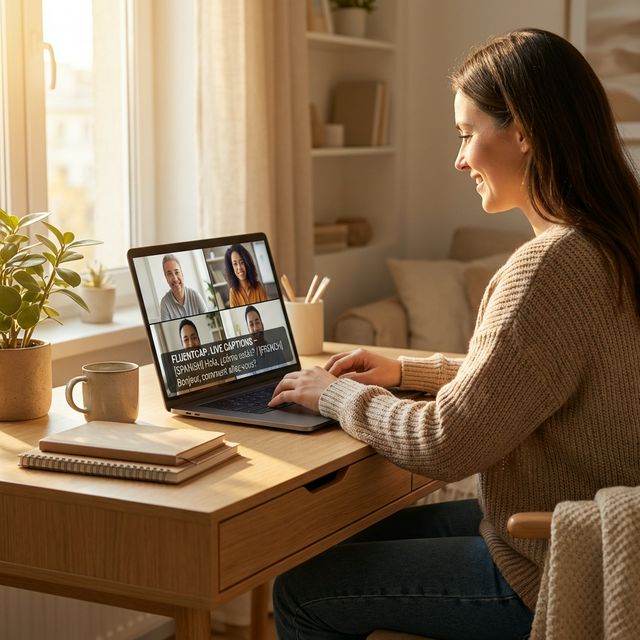
Five Daily Scenarios Where Cross-Border Communication Breaks Down
Multilingual collaboration problems do not just surface in formal meetings. They affect every touchpoint of remote collaboration:
1. Daily Stand-ups and Async Updates
Your morning stand-up includes team members from Brazil, Germany, and Vietnam. The Brazilian developer explains a blocker in fast-paced English with a strong accent. The Vietnamese designer misses a critical detail. The German engineer sends a follow-up message that gets lost in translation. By afternoon, three people are working on conflicting assumptions.
2. Client Presentations and Sales Demos
Cross-border sales calls require precision. A misunderstood feature description or an awkward phrasing can cost a deal. When your prospect speaks a different primary language, every word matters — and built-in Zoom captions often struggle with technical vocabulary and accents.
3. Training and Onboarding
New hires joining from another country face a double challenge: learning the company culture and processing everything in a non-native language. Research on comprehensible input shows that learners need to understand 90-98% of what they hear for effective knowledge transfer. Onboarding calls at natural speed rarely hit that threshold.
4. Async Video Messages
Tools like Loom and Vidyard have revolutionized async communication. But a 5-minute video message recorded in rapid English by a native speaker can take a non-native speaker 20 minutes to process — with no option to ask for clarification in real-time.
5. Documentation and Code Review
Technical documentation, pull request comments, and architecture decision records are almost always written in English. For non-native speakers, parsing dense technical prose while evaluating code logic creates cognitive overload — the same dual burden that affects multilingual learners in education.
The 4-Step Framework for Reducing Language Friction
Based on patterns from organizations that have successfully built multilingual remote cultures, here is a practical framework:
Step 1: Diagnose — Identify Where Communication Breaks
Before investing in tools or training, understand where language friction actually occurs in your team:
- Survey your team anonymously about communication pain points
- Review post-mortems for miscommunication-related failures
- Track meeting follow-ups — if clarification emails spike after calls, that is a signal
- Evaluate documentation — are critical docs only available in one language?
The OECD's research on multilingual workplaces emphasizes that language policies should be evidence-based, not assumption-based.
Step 2: Document — Create a Shared Communication Standard
Establish clear protocols that reduce ambiguity:
- Define a functional language for official communication, but support others for relationship building
- Create glossaries of project-specific terminology with translations
- Write meeting summaries after every call — not just for record-keeping, but for comprehension verification
- Use structured templates for recurring communications (stand-up updates, status reports)
Research shows that structured digital communication reduces misunderstandings by up to 50%.
Step 3: Transcribe — Add Real-Time Language Support
This is where technology fills the gap that processes alone cannot:
- Live captions during video calls let non-native speakers read along
- Translation overlays provide instant comprehension in any language
- Recorded transcripts allow async review at each person's own pace
- Vocabulary highlighting helps build domain-specific language proficiency
We built FluentCap as one solution for this step — it captures any audio on your computer and generates real-time transcription and translation. But it is important to recognize that transcription is one tool in a larger strategy, not a silver bullet.
Step 4: Reinforce — Build Long-Term Language Capacity
Tools bridge the immediate gap, but sustainable teams invest in long-term language development:
- Provide language learning resources — only 24% of workplaces currently offer language training
- Pair bilingual team members as "language bridges" for critical discussions
- Celebrate multilingual contributions — encourage team members to share insights in their strongest language
- Review and iterate — revisit your Diagnose step quarterly
How Real-Time Transcription Fits Into the Solution
Real-time transcription is most valuable in Step 3 of the framework above — bridging the gap between what is said and what is understood.
Where Transcription Helps Most
| Scenario | Impact |
|---|---|
| Live meetings (Zoom, Teams, Meet) | Non-native speakers can read along, reducing cognitive load |
| Async video review (Loom, Vidyard) | Transcripts allow careful review at individual pace |
| Training and onboarding sessions | New hires capture every detail without asking for repeats |
| Client presentations | Translation layer ensures cross-border comprehension |
| Multi-accent team calls | Text eliminates accent comprehension challenges |
FluentCap's Approach
FluentCap captures system-level audio, which means it works with any platform without integrations:
- Any meeting tool — Zoom, Teams, Meet, Slack Huddles, Discord
- Any video player — Loom recordings, training videos, webinars
- Real-time translation — 50+ languages across multiple providers
- Learning tools — Highlight vocabulary, check pronunciation with IPA, and record sessions
If your team is already struggling with multilingual calls, try FluentCap — it is free and takes 2 minutes to set up.
Honest Limitations
No tool is perfect for every situation:
| Limitation | Context |
|---|---|
| Accuracy varies with audio quality | Background noise, poor microphones, and heavy accents reduce accuracy |
| Technical jargon | Highly specialized terminology may not be recognized correctly |
| Cultural nuance | Transcription captures words, not cultural context or implied meaning |
| Written communication gaps | Transcription helps with spoken language but does not address email/chat barriers |
When Transcription Is Not Enough: Alternative Approaches
Real-time transcription is powerful, but it is not the only solution — and sometimes it is not the right one. Here are complementary and alternative strategies:
Documentation-First Culture
For teams where most communication happens asynchronously, investing in clear written documentation may have more impact than live transcription:
- Internal wikis in multiple languages
- Visual documentation — diagrams, flowcharts, and annotated screenshots reduce language dependency
- Threaded discussions — platforms like Notion, Linear, or GitHub Discussions allow considered responses
Structured Async Communication
Instead of defaulting to video calls, consider:
- Written stand-ups via Slack/Teams bots — everyone composes at their own pace
- Pre-recorded videos with scripts — speakers can prepare and articulate clearly
- Collaborative documents with comment threads — async by nature, translatable by design
Language Training Programs
For long-term investment, the British Council's research shows that even basic proficiency in a shared language dramatically improves team dynamics. Companies like Duolingo for Business and Babbel for Business offer team-based programs.
When to Choose Which Approach
| Situation | Best Approach |
|---|---|
| Live meetings with language gaps | Real-time transcription + translation |
| Async-heavy teams | Documentation-first culture |
| Long-term team building | Language training programs |
| Technical discussions | Visual documentation + glossaries |
| Client-facing communication | Transcription + professional translation |
Setting Up Real-Time Captions for Your Remote Workday
If real-time transcription is the right fit for your team (Step 3 of the framework), here is how to get started:
1. Download and Install
Visit fluentcap.live and download FluentCap for macOS or Windows. Installation takes under 2 minutes.
2. Choose Your Provider
FluentCap works with several speech-to-text providers. Each offers generous free tiers:
| Provider | Free Credits | Approx. Hours | Strengths |
|---|---|---|---|
| Deepgram | $200 | ~750 hours | Fast English transcription |
| AssemblyAI | $50 | ~140 hours | Strong punctuation and formatting |
| Gladia | 10 hrs/month | Resets monthly | 99+ languages, auto-detection |
| Shunya | $100 | ~300 hours | Cost-effective for long sessions |
3. Daily Workflow Tips
Morning stand-up: Start FluentCap before joining — captions appear in a floating overlay you can position anywhere.
Async video review: Play Loom recordings with FluentCap running — the transcript gives you a searchable text version.
Client calls: Enable translation if the client speaks another language. FluentCap runs locally and is invisible to other participants.
Pro tip: For multilingual meetings with language switching, use Gladia — its auto-detection handles mid-conversation language changes.
Building a Language-Inclusive Remote Culture
Pearson's 2026 ELT trends report highlights multimodal literacy as a defining trend: combining text, audio, video, and interactive elements for better comprehension. This principle applies directly to remote team communication.
Practical Steps for Team Leaders
Communication practices:
- Speak at a measured pace during calls — rushing excludes non-native speakers
- Avoid idioms, slang, and culture-specific references in formal communication
- Follow up verbal discussions with written summaries
Meeting culture:
- Share agendas and key vocabulary before meetings
- Record all calls (with consent) so team members can review with transcription
- Allow extra processing time for questions and responses
Hiring and onboarding:
- Evaluate candidates on communication clarity, not accent or grammar perfection
- Provide onboarding materials in multiple formats — video with captions, written docs, visual guides
- Assign multilingual buddies for the first 90 days
The Business Case for Language Inclusion
According to the World Economic Forum, language shapes how people think, solve problems, and perceive the world. Teams that harness linguistic diversity — rather than suppressing it — access fundamentally different perspectives and approaches.

Thank You to Our Providers
FluentCap is made possible by speech-to-text providers who believe in making global communication accessible:
- Deepgram: $200 in free credits (~750 hours)
- AssemblyAI: $50 in free credits (~140 hours)
- Gladia: 10 free hours every month
- Shunya: $100 in free credits (~300 hours)
When your free credits run out, we encourage you to support them. Their pricing is incredibly fair — just $0.15-0.40 per hour, which is 60-80% cheaper than traditional subscription apps. They deserve your support for making speech-to-text technology accessible to teams everywhere.
Frequently Asked Questions
How do language barriers affect remote work productivity?
Research from the University of Kent found that 67% of employees feel their productivity is impacted by language barriers. In remote settings, the problem is amplified because teams lose non-verbal cues and have fewer opportunities for casual clarification. The Project Management Institute reports that miscommunication causes up to 80% of project failures.
What are the best strategies for overcoming language barriers in remote teams?
The most effective approach combines multiple strategies: (1) diagnose where communication breaks down, (2) establish structured communication protocols, (3) use real-time transcription tools for live and async communication, and (4) invest in long-term language capacity building. No single tool solves everything — it requires intentional culture and process changes.
How does real-time transcription compare to professional translation services?
Real-time transcription with AI translation is best for day-to-day communication — meetings, video messages, and training sessions where speed matters more than perfection. Professional translation services remain essential for legal documents, marketing materials, and customer-facing content where accuracy and cultural nuance are critical.
Can FluentCap transcribe Zoom, Teams, Slack, and Loom?
Yes. FluentCap captures audio at the system level, so it works with any platform — Zoom, Microsoft Teams, Google Meet, Slack Huddles, Discord, Loom, Vidyard, and any other tool that plays audio on your computer. No integration or plugin is required.
When should a team NOT rely on transcription tools?
Transcription tools are less effective when: (1) the primary communication barrier is cultural context, not language comprehension, (2) your team communicates mostly through written channels where translation plugins work better, (3) audio quality is consistently poor (noisy environments, bad microphones), or (4) highly specialized jargon dominates every conversation. In these cases, invest in documentation culture, visual communication, and targeted language training instead.
Language Should Never Limit Your Team
The best remote teams are multilingual teams. They bring diverse perspectives, creative problem-solving, and round-the-clock coverage. The gap between a good global team and a great one is communication — and closing that gap requires both the right tools and the right culture.
Start with the 4-Step Framework: Diagnose where friction exists, Document your communication standards, Transcribe to bridge immediate gaps, and Reinforce with long-term investment.
When you are ready to add real-time transcription to your team's workflow, give FluentCap a try.
Related Articles
More ways to collaborate across languages:
- FluentCap for International Meetings — Live captions for video conferencing
- English Interview Confidence with FluentCap — Prepare for cross-language job interviews
- Language Barriers in Education: Solutions — How technology closes the education gap
- Online Courses in Any Language with AI Subtitles — Access global education without language limits
- FluentCap Audio Recording & Playback — Save and review transcribed sessions
— FluentCap Team
Built to bring good things to the world.