Speech-to-Text API Comparison 2026: Deepgram vs AssemblyAI vs Gladia
Choosing the right speech-to-text provider can be overwhelming. We tested all major STT APIs to help you find the perfect fit for your needs.
Table of Contents
- Quick Summary: Which Provider Is Right for You?
- Testing Methodology
- Deepgram: The Speed Champion
- AssemblyAI: The Feature King
- Gladia: The Multilingual Specialist
- Shunya: The Budget-Friendly Newcomer
- Head-to-Head Comparison
- Pricing Deep Dive
- Real-World Recommendations
- How to Get Started
- Frequently Asked Questions
The Speech-to-Text Landscape in 2026
The speech-to-text (STT) industry has evolved dramatically. With the rise of AI-powered models and increased demand for real-time transcription, choosing the right provider has become more complex—and more important—than ever.
Whether you're building a voice assistant, transcribing meetings, or adding captions to content, the provider you choose impacts accuracy, cost, and user experience.
We've tested all major STT providers extensively through FluentCap to bring you this comprehensive comparison. This isn't marketing material—it's real-world experience from transcribing thousands of hours of audio.
Quick Summary: Which Provider Is Right for You?
Before diving deep, here's our quick recommendation based on use case:
| Your Priority | Best Choice | Why |
|---|---|---|
| Speed & Real-time | Deepgram | Sub-300ms latency, excellent streaming |
| Accuracy (English) | AssemblyAI | 93%+ word accuracy, best punctuation |
| Multilingual | Gladia | 100+ languages, seamless code-switching |
| Budget | Shunya or Gladia | Lowest per-hour costs |
| Free Credits | Deepgram | $200 credits (~400+ hours) |
| Speaker Identification | AssemblyAI | Industry-leading diarization |
Testing Methodology
To ensure fair comparison, we tested each provider using:
- Audio sources: Movies, podcasts, meetings, lectures, and live streams
- Languages: English, Japanese, Korean, Spanish, French, German, Mandarin
- Conditions: Clean audio, background noise, multiple speakers, accents
- Metrics: Word accuracy, latency, language detection accuracy, cost per hour
All tests were conducted through FluentCap's real-time streaming mode—the same experience you'll have as a user.
Deepgram: The Speed Champion
Deepgram has positioned itself as the leader in real-time voice applications, and for good reason.
Accuracy
Deepgram's Nova-3 model achieves 88-92% accuracy on clear English audio, comparable to Google's Chirp and OpenAI's Whisper. According to industry benchmarks, Deepgram claims a 30% lower Word Error Rate (WER) compared to AssemblyAI in production workloads.
For specialized use cases, their industry-specific models are impressive:
- Nova-3 Medical: 1-10% WER for healthcare terminology
- Nova-3 Phonecall: Optimized for call center audio
Speed & Latency
This is where Deepgram truly shines:
- Sub-300 millisecond latency for real-time streaming
- Can transcribe 1 hour of audio in ~12 seconds (batch mode)
- Handles thousands of concurrent connections at enterprise scale
For live captioning, video calls, or voice assistants, this speed is unmatched.
Language Support
Deepgram supports 100+ languages, though their accuracy is strongest in English, Spanish, French, German, and Portuguese. Asian languages (Japanese, Korean, Mandarin) are supported but may have lower accuracy compared to specialists.
Pricing
| Plan | Price | Notes |
|---|---|---|
| Free Credits | $200 | ~400-750 hours depending on model |
| Pay-As-You-Go | $0.0077/min ($0.46/hr) | Nova-3 streaming |
| Growth Plan | $0.0065/min | ~20% discount, starts at $4,000/year |
| Enterprise | Custom | Starts at $10,000/year |
Our Verdict on Deepgram
Best for: Real-time applications, voice assistants, live captioning, high-volume production workloads.
Not ideal for: Projects requiring maximum multilingual accuracy or advanced AI features like summarization.
AssemblyAI: The Feature King
AssemblyAI takes a different approach—combining transcription with powerful AI features through their LeMUR framework.
Accuracy
AssemblyAI's Universal model is their flagship, claiming to be up to 40% more accurate than competing STT models. Our testing found:
- 93.4% Word Accuracy Rate for English
- Excellent performance with varied accents and dialects
- Strong punctuation and formatting
However, we noticed some struggles with:
- Very noisy audio environments
- Overlapping speakers in fast-paced conversations
AI-Powered Features
What sets AssemblyAI apart is their integrated AI capabilities:
- LeMUR: Built-in LLM for summarization, Q&A, and content analysis
- Speaker Diarization: Industry-leading "who said what" detection
- Sentiment Analysis: Understand emotional tone
- Content Moderation: Automatic detection of sensitive content
These features are game-changers for meeting transcription, podcast production, and content analysis.
Language Support
AssemblyAI's real-time streaming supports 6 languages, with batch processing supporting more. This is more limited than Deepgram or Gladia, making it less suitable for truly multilingual applications.
Pricing
| Plan | Price | Notes |
|---|---|---|
| Free Credits | $50 | ~140 hours basic transcription |
| Core | $0.12/hr | Basic transcription |
| Streaming | $0.15/hr | Real-time transcription |
| With Features | Variable | Add-ons increase cost |
Our Verdict on AssemblyAI
Best for: English-first projects, meeting transcription, content analysis, applications needing summarization or speaker identification.
Not ideal for: Highly multilingual applications, ultra-low-latency requirements, or budget-constrained projects with high volume.
Gladia: The Multilingual Specialist
Gladia has carved out a unique position as the go-to provider for multilingual real-time transcription.
Accuracy
Gladia's Solaria model claims 94%+ word accuracy with significant improvements over standard Whisper:
- 39% fewer errors compared to base Whisper
- 17% better precision on named entities (names, places, dates)
- Reduced hallucinations through their proprietary "Whisper-Zero" technology
Their core innovation is a heavily modified version of OpenAI's Whisper, engineered specifically for production reliability.
Multilingual Excellence
This is Gladia's superpower:
- 100+ languages supported in real-time
- Code-switching: Seamlessly handles conversations that switch between languages
- Automatic language detection: No need to specify language upfront
For international meetings or multilingual content, Gladia is unmatched.
Speed & Latency
Gladia delivers impressive real-time performance:
- Partial transcripts: ~300ms
- Final confirmed transcripts: ~700ms for typical utterances
- Solaria model: Further reduces interruption latency to 270ms
Pricing
| Plan | Price | Notes |
|---|---|---|
| Free | 10 hrs/month | Resets monthly, forever free |
| Pro | $0.612/hr | All features included |
| Enterprise | Custom | Volume discounts available |
The free tier is particularly attractive—10 hours per month, forever. For casual users, you may never need to pay.
Our Verdict on Gladia
Best for: Multilingual applications, international meetings, content creators working across languages, casual users (free tier).
Not ideal for: English-only projects where maximum accuracy is critical, or very high-volume production (pricing can add up).
Shunya: The Budget-Friendly Newcomer
Shunya is a newer entrant offering competitive pricing and solid performance.
What We Know
Shunya offers:
- $100 in free credits (~300+ hours)
- Pricing around $0.15/hour after free credits
- Focus on accessibility and affordability
When to Consider Shunya
Shunya is worth exploring if:
- Budget is your primary concern
- You need high volume for a cost-sensitive project
- You're willing to be an early adopter
We recommend testing with their free credits before committing to production use.
Head-to-Head Comparison
Here's how all providers stack up across key dimensions:
| Feature | Deepgram | AssemblyAI | Gladia | Shunya |
|---|---|---|---|---|
| Accuracy (English) | 90-92% | 93%+ | 94%+ | ~88% |
| Real-time Latency | <300ms | 500ms+ | <300ms | ~400ms |
| Languages | 100+ | 6 (real-time) | 100+ | 30+ |
| Speaker ID | ✅ Basic | ✅ Excellent | ✅ Good | ✅ Basic |
| AI Features | ❌ Limited | ✅ Excellent (LeMUR) | ❌ Basic | ❌ Limited |
| Free Credits | $200 | $50 | 10 hrs/mo | $100 |
| Per-Hour Cost | ~$0.46 | ~$0.15-0.36 | ~$0.61 | ~$0.15 |
Accuracy Comparison by Language
| Language | Deepgram | AssemblyAI | Gladia |
|---|---|---|---|
| English | ⭐⭐⭐⭐ | ⭐⭐⭐⭐⭐ | ⭐⭐⭐⭐ |
| Spanish | ⭐⭐⭐⭐ | ⭐⭐⭐ | ⭐⭐⭐⭐⭐ |
| Japanese | ⭐⭐⭐ | ⭐⭐ | ⭐⭐⭐⭐ |
| Korean | ⭐⭐⭐ | ⭐⭐ | ⭐⭐⭐⭐ |
| French | ⭐⭐⭐⭐ | ⭐⭐⭐ | ⭐⭐⭐⭐⭐ |
| Mandarin | ⭐⭐⭐ | ⭐⭐ | ⭐⭐⭐⭐ |
Pricing Deep Dive
Understanding true costs requires looking beyond per-minute rates.
Free Credits Comparison
| Provider | Free Credits | Estimated Hours | Expiration |
|---|---|---|---|
| Deepgram | $200 | 400-750 hrs | Never expires |
| AssemblyAI | $50 | ~140 hrs | Never expires |
| Gladia | 10 hrs/month | ∞ (resets) | Monthly |
| Shunya | $100 | ~300 hrs | Never expires |
Total Cost for 100 Hours/Month
| Provider | Monthly Cost | Annual Cost |
|---|---|---|
| Deepgram | ~$46 | ~$552 |
| AssemblyAI | ~$15-36 | ~$180-432 |
| Gladia | ~$55 (or $0 if <10 hrs) | ~$660 |
| Shunya | ~$15 | ~$180 |
Cost Comparison vs Traditional Subscriptions
It's worth noting how these API costs compare to traditional transcription subscriptions:
| Solution | Monthly Cost | What You Get |
|---|---|---|
| Otter.ai Pro | $16.99 | 90 mins/month |
| Trint | $60+ | Unlimited, but no real-time |
| Rev.com | $1.50/min | Human + AI hybrid |
| FluentCap + Provider | ~$15-50 | 100+ hours, real-time |
Using BYOK (Bring Your Own Key) through FluentCap gives you 60-80% cost savings compared to most subscription services.
Real-World Recommendations
Based on our extensive testing, here are our recommendations:
For FluentCap Users
Start with Deepgram for most use cases:
- Generous $200 free credits
- Excellent real-time performance
- Great accuracy across common languages
Switch to Gladia if:
- You primarily use non-English content
- You need code-switching capability
- You use less than 10 hours/month (free forever)
Consider AssemblyAI if:
- You need speaker identification
- You work primarily with English content
- You want AI-powered summarization
For Developers Building Applications
- Voice Assistants: Deepgram (lowest latency)
- Meeting Transcription: AssemblyAI (speaker diarization + summarization)
- Global Applications: Gladia (multilingual excellence)
- Prototyping: Any provider with free credits
How to Get Started
Getting your API key takes just minutes. Here's how:
Deepgram (Recommended First Choice)
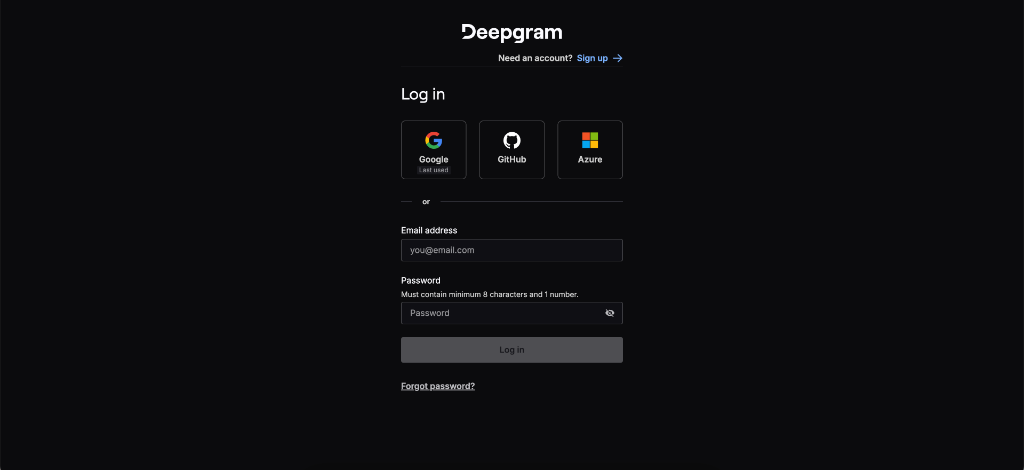
- Visit console.deepgram.com and sign up
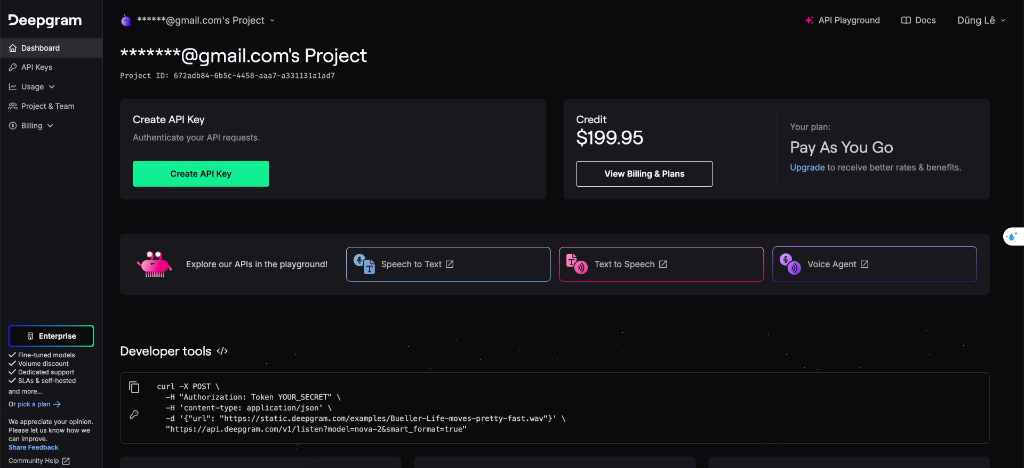
- After signing in, you'll see your dashboard with $199.95 free credits
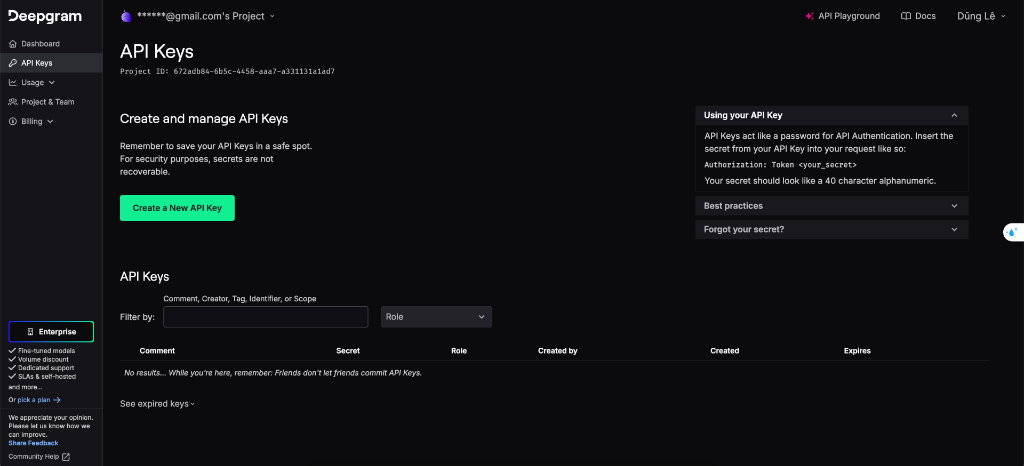
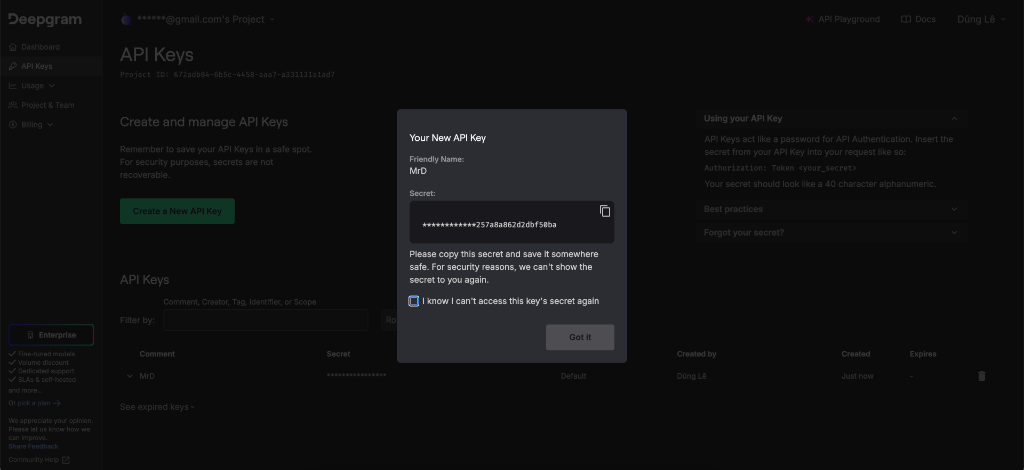
- Click API Keys in the left sidebar
- Click Create a New API Key, name it "FluentCap"
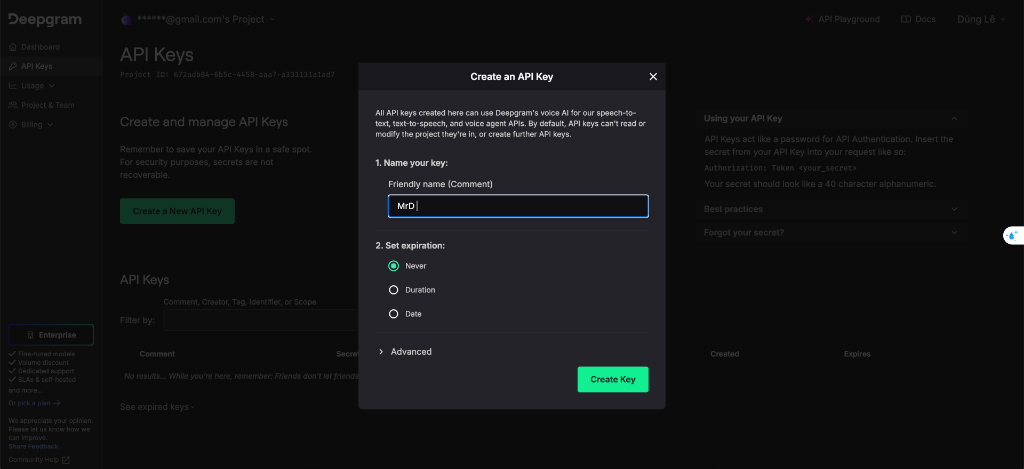
- Copy your key immediately (you won't see it again!)
AssemblyAI
- Go to assemblyai.com and click "Get Started"
- Sign up and navigate to Dashboard → API Keys
- Copy your API key
Gladia
- Visit app.gladia.io
- Create an account
- Copy your API key from the dashboard
Using with FluentCap
Once you have your API key:
- Download FluentCap from our homepage
- Open Settings and select your provider
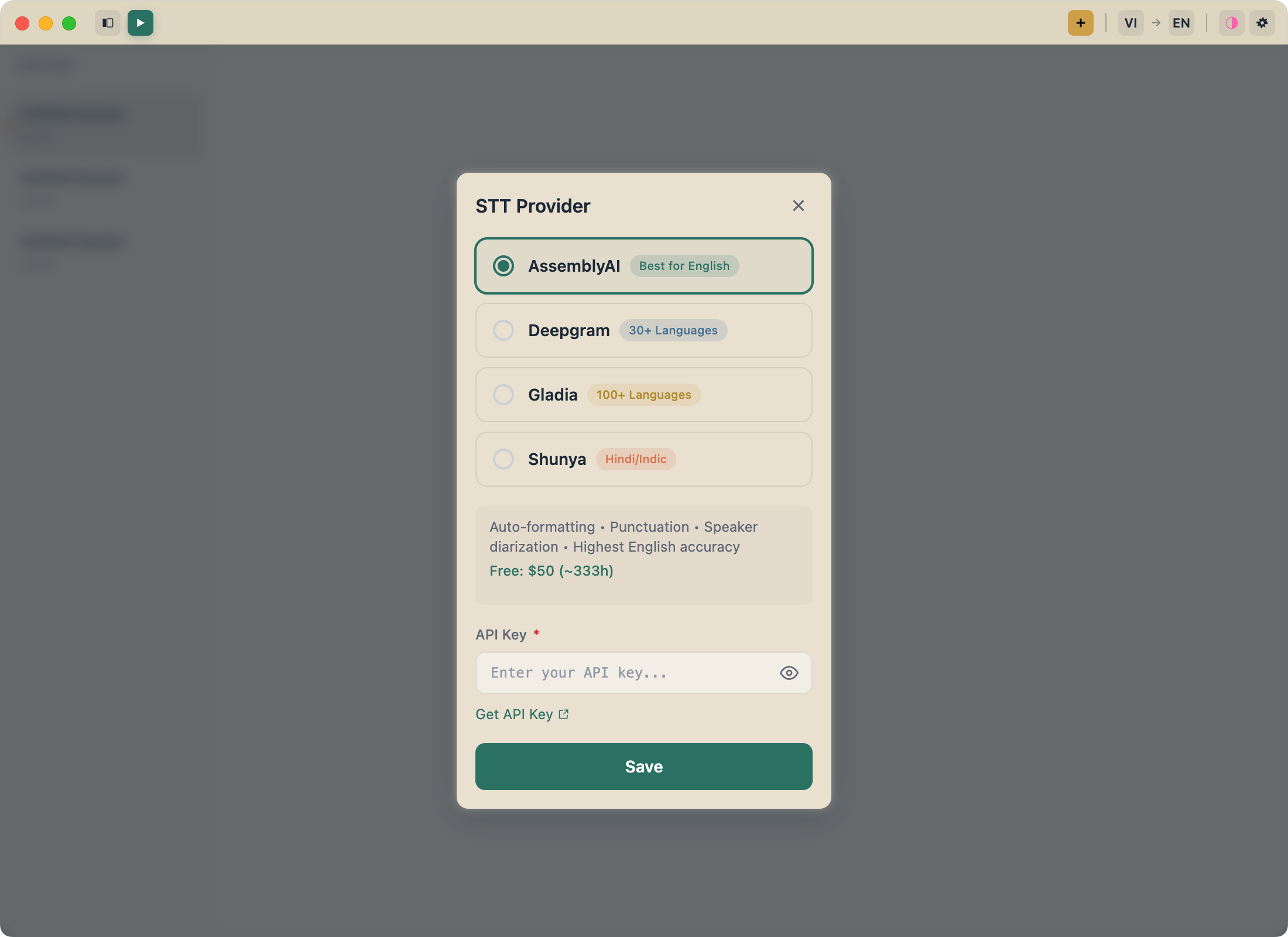
- Paste your API key and start transcribing!
A Note of Gratitude
We're deeply grateful to Deepgram, AssemblyAI, Gladia, and Shunya for making professional transcription accessible to everyone. Their generous free tiers and fair pricing make FluentCap possible.
When your free credits run out, we encourage you to support these providers. At just $0.15-0.60 per hour, their pricing is incredibly fair—60-80% cheaper than traditional subscription apps. They deserve your support for democratizing speech-to-text technology.
Frequently Asked Questions
Which provider has the best accuracy?
For pure English accuracy, AssemblyAI's Universal model leads at 93%+. For multilingual content, Gladia's Solaria model excels. Deepgram offers the best balance of speed and accuracy for real-time applications.
How long will free credits last?
With typical use of 1-2 hours per day, Deepgram's $200 credits alone could last 6+ months. Most casual users never exhaust their free credits.
Can I switch providers in FluentCap?
Yes! FluentCap supports multiple providers. You can switch anytime in Settings, or even have different API keys for different use cases.
Which provider is best for Japanese/Korean/Chinese?
Gladia consistently outperforms in Asian languages due to their multilingual focus and Whisper-Zero technology.
Is real-time transcription accurate enough?
Modern STT providers achieve 88-94% accuracy in real-time, comparable to pre-recorded transcription. For most use cases (captions, meetings, language learning), this is more than sufficient.
What about privacy? Where does my audio go?
Your audio goes directly to the provider you choose (Deepgram, AssemblyAI, or Gladia)—FluentCap never stores or accesses your data. All providers have enterprise-grade security and privacy policies.
Start Transcribing Today
Ready to experience professional transcription?
- Download FluentCap
- Sign up with any provider above (we recommend Deepgram to start)
- Start transcribing in less than 5 minutes
Language shouldn't be a barrier to understanding. Whether you're learning languages through movies, joining international meetings, or making content accessible—FluentCap and these amazing providers make it possible.
Related Articles
Explore more ways to use real-time transcription:
- Learn Languages by Watching Movies — Turn entertainment into education
- Watch Foreign Movies with Real-Time Subtitles — Enjoy content from any country
- Real-Time Captions for Accessibility — Making audio accessible for everyone
— FluentCap Team
Built to bring good things to the world.